
What you’ll learn
Each workspace has its own records, settings, and subscription context. The workspace switcher lets you move between the workspaces you can access.
- Open switcher
- Select workspace
- Confirm before working
Before you begin
Sign in with your FieldNovi account. You will only see workspaces you own or have joined.
STEP 1 OF 3
Open the current workspace menu
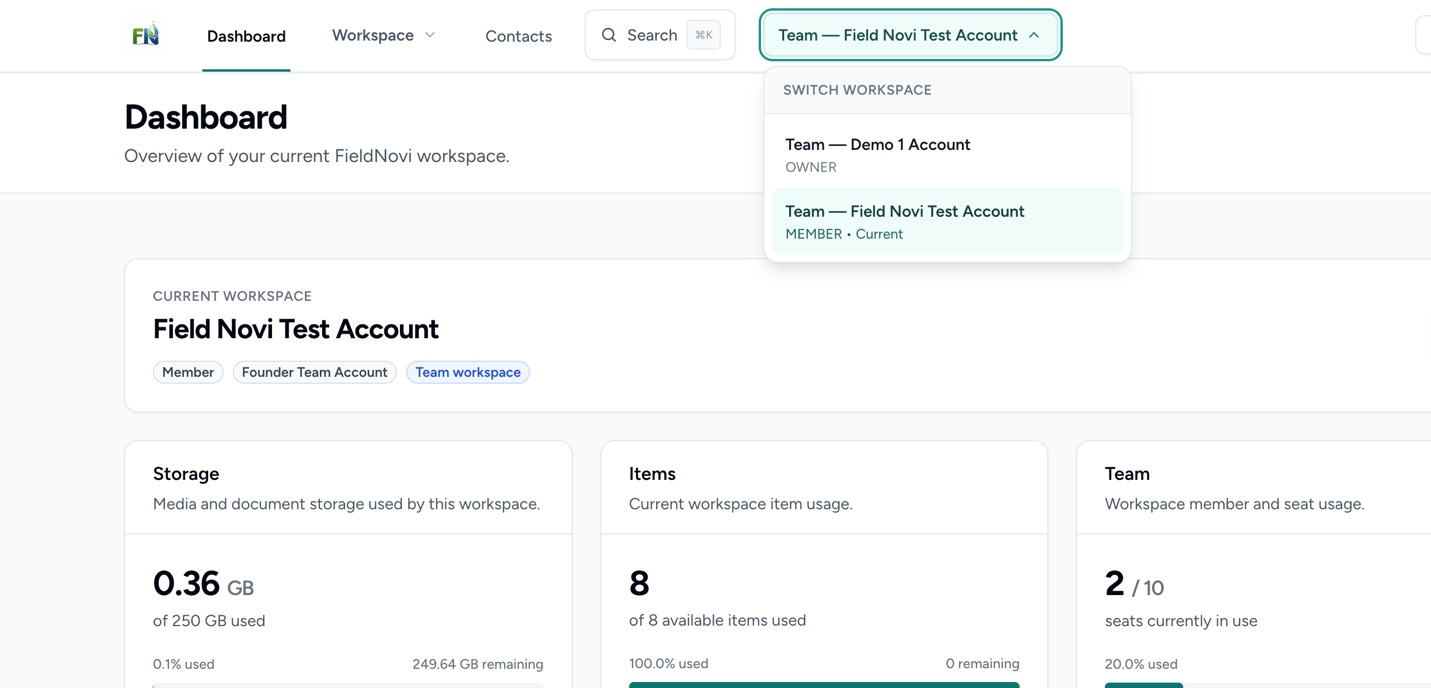
Select the workspace name in the top navigation, such as Team — Field Novi Test Account. The menu lists the workspaces available to your login and shows your role.
STEP 2 OF 3
Select the workspace you need
Select the personal or team workspace where you want to work. Confirm the workspace name in the header and on the dashboard after switching.
Contacts, searches, records, settings, and billing are tied to the selected workspace.
STEP 3 OF 3
Check the workspace before adding records
Before creating a customer, project, inspection, or visit, verify that the correct workspace is selected. Records cannot currently be moved from a personal workspace into a team workspace.
If your personal workspace does not have an active subscription, FieldNovi may take you to an available subscribed workspace when you sign in. Always check the header before starting work.
GOOD HABITS
Best practices
- Check the workspace name at the start of each session.
- Switch to the intended team before creating shared work.
- Review the selected workspace before making billing or data-management changes.
QUICK ANSWERS
Common questions
Can I move existing records from my personal workspace to a team?
Not currently. Select the intended team workspace before creating the records. Contact Support if you need help deciding how to handle records created in the wrong workspace.
Why can’t I see a team in the switcher?
Confirm that you accepted the team invitation with the same email address you use to sign in. See Invite and join a team. Ask the team owner to check your membership if it is still missing.
Will switching workspaces combine their contacts or records?
No. Workspaces keep their own records and settings. Switching changes the workspace you are viewing and working in.
FIELDNOVI SUPPORT
Still need help?
Email support@fieldnovi.com for questions or anything that is not working as expected.
Include these details
- Your name and organization.
- The workspace and any relevant record names.
- What you were trying to do and what happened instead.
- Any error message and a screenshot, when possible.
- The approximate date and time the issue occurred.
Do not include passwords or payment card details.